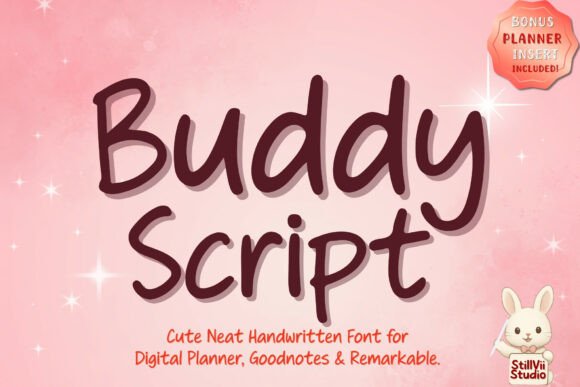
Buddy Script: A Neat, Minimal Handwriting Font for Digital Planning
In the world of digital creativity, the tools we choose directly impact our workflow and the final result. For anyone who spends hours on an iPad crafting digital planners, annotating study notes, or building social media content, a font isn't just a set of characters—it's a piece of the experience. Buddy Script enters this space as a thoughtfully designed handwritten font that bridges the gap between personal charm and professional clarity. It’s a script font built for the screen-first world, offering the warmth of handwriting without the typical drawbacks of illegibility or messy styling.
The Anatomy of a Practical Handwriting Typeface
At its core, Buddy Script is defined by its minimal script aesthetic. The letterforms are clean, with consistent stroke weights that avoid the dramatic thick-and-thin contrasts often found in calligraphic fonts. This design choice is critical; it ensures that whether you’re writing a quick grocery list in Goodnotes or crafting a motivational quote for Instagram, every word remains perfectly legible at various sizes. The typeface features neat, slightly rounded terminals and a gentle baseline shift that mimics natural handwriting, but with enough structure to prevent the text from looking chaotic. It’s a creative font that feels personal and approachable, yet disciplined enough for organized projects.
The visual personality of Buddy Script is one of quiet confidence. It doesn’t scream for attention with wild flourishes. Instead, its charm lies in its consistency and warmth. This makes it an excellent display font for headings where you want to inject personality without sacrificing readability. For a brand, using Buddy Script in a logo or on packaging can convey a sense of handmade care, approachability, and authenticity. It’s the kind of font that says, “We pay attention to the details,” which is a powerful message for small businesses, artisans, and content creators.
Where Buddy Script Truly Shines: From Digital Planners to Brand Identities
The real test of any premium font is its versatility. Buddy Script finds its sweet spot in projects where clarity and personality must coexist. The most obvious application is in the realm of digital planning and journaling. If you use apps like Goodnotes or Notability, you know the frustration of a font that looks beautiful in a word processor but becomes a smudged mess when written with an Apple Pencil. Buddy Script’s perfectly legible strokes are engineered for this environment. Every to-do list, mind map, and weekly schedule entry feels clear and tidy, reducing cognitive load and making the planning process itself more inspiring.
Beyond personal use, its applications are broad. Consider these practical scenarios:
- Editorial Design & Publishing: Use it for pull quotes, chapter titles, or annotations in a cookbook or lifestyle magazine. It adds a human touch that a standard serif font or sans serif font can’t provide.
- Marketing & Social Media: Create engaging Instagram stories, Pinterest pins, or Facebook graphics. The font’s warmth increases engagement by making content feel more personal and less corporate.
- Packaging & Product Design: For artisanal products, cosmetics, or boutique goods, Buddy Script on labels or tags can communicate handmade quality and attention to detail, strengthening brand identity.
- Web Design & UI: While script fonts should be used sparingly for body text online, Buddy Script works wonderfully for website hero quotes, menu item names on a restaurant site, or button labels to guide user interaction.
It’s important to note that while Buddy Script is a versatile commercial font, it’s not a one-size-fits-all solution. It wouldn’t be the right choice for setting long paragraphs of body copy in a formal report, where a clean serif font or sans serif font excels. Its strength is in accents, highlights, and short bursts of text where its personality can shine without hindering comprehension.
Making It Work: Practical Guidance for Your Projects
Integrating a new font into your toolkit is a strategic decision. Here’s how to evaluate if Buddy Script is the right fit. First, consider your project’s tone. If you’re aiming for warmth, approachability, and a touch of creativity, it’s a strong contender. For ultra-corporate or highly technical content, you might reserve it for very specific, non-critical elements.
Next, think about font pairing. A script font like Buddy Script rarely works well alone for all text. The most effective pairings often involve a sturdy, neutral companion. Try combining it with a geometric sans serif font for a modern, clean look. Alternatively, pair it with a classic, readable serif font for a more traditional, editorial feel. The key is contrast: let Buddy Script handle the headlines or callouts while your secondary font manages the bulk of the information.
Before committing, test it rigorously. Download the trial if available, and see how it performs in your specific environment. Type out your most common phrases. Check the readability at small sizes, especially if you plan to use it for digital planner text. Review all the included styles and glyphs—does it have the special characters or alternates you need? Understanding the full scope of the design assets included with your license prevents surprises later.
Finally, respect the licensing. Since Buddy Script is a premium font, ensure the license you purchase covers your intended use, whether it’s for personal digital planners, client work, or commercial products like merchandise. Using fonts within their licensed terms is a non-negotiable part of professional modern typography practice.
In the end, choosing a font like Buddy Script is about adding a specific tool to your creative arsenal. It’s for the moments when you need your work to feel human, organized, and inviting. Whether you’re a student creating study highlights, a marketer designing social media graphics, or a small business owner building a cohesive brand, its neat, minimal charm offers a reliable way to bring clarity and warmth to every project.